Deploy Coolify in one click
Your own PaaS on your own server, ready in minutes
Coolify is an open-source, self-hostable PaaS – an alternative to Vercel, Heroku, and Netlify that deploys applications, databases, and services onto servers you control.
-

 Git push to deploy
 -

 Unlimited applications and domains
 -

 Automatic Let's Encrypt certificates
 -

 Preview deployments per pull request
 -

 200+ one-click service templates
 -

 Multi-server management over SSH

 Installs with
your VPS

 Full root
access

 Live in
~2 minutes

 Instant dashboard access
Key features
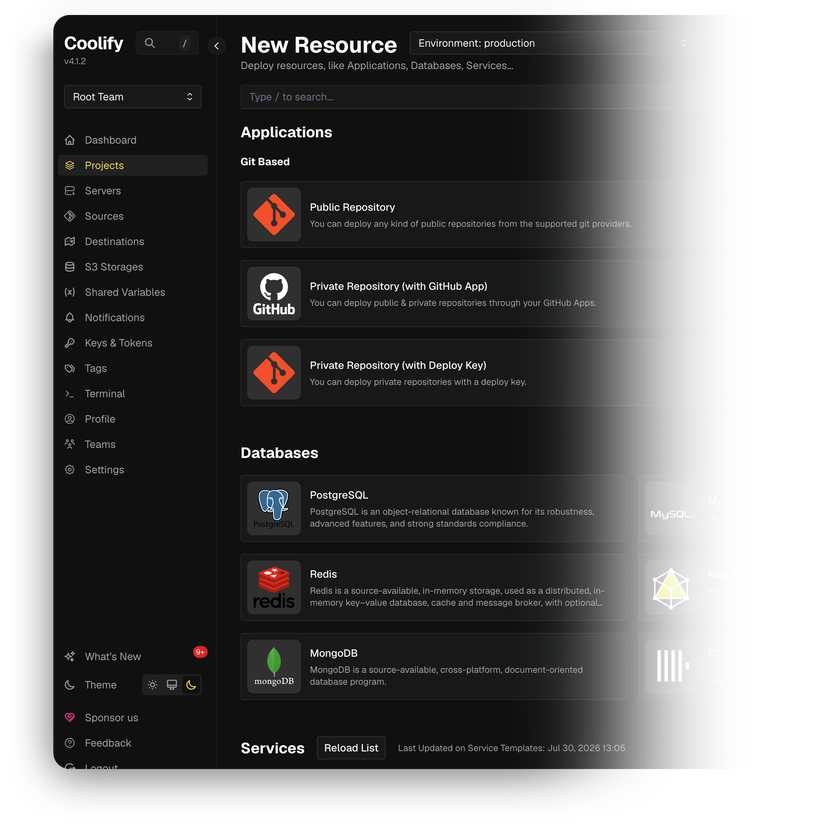
Railpack and Nixpacks build the image straight from your repository, or point Coolify at your own Dockerfile, Compose file, static output, or a prebuilt registry image.
PostgreSQL, MySQL, MariaDB, MongoDB, Redis, KeyDB, DragonFly, and ClickHouse deploy from the dashboard, reachable over internal URLs or an on-demand public port.
Enter a domain with the https:// protocol and the built-in proxy requests a Let's Encrypt certificate, then renews it before the 90-day expiry with no manual step.
PostgreSQL, MySQL, MariaDB, and MongoDB dumps run on cron expressions and ship to any S3-compatible storage, and Coolify's own PostgreSQL database is backed up the same way.
Coolify watches disk usage with automatic cleanup, container stops and restarts, and backup status, then alerts over email, Telegram, Discord, Slack, Mattermost, Pushover, or webhooks.
Automate deployments through a bearer-token REST API, trigger builds from GitHub Actions or GitLab CI, and open a shell on any container straight from the browser.
System requirements
View All VPS Options
Get started in 4 easy steps
-
1
Select a VPS plan
Choose the virtual server resources and performance tiers that fit your project requirements.
-
2
Pick your application
Browse our marketplace during VPS setup and select the self-hosted software you want to deploy.
-
3
Complete the payment
Pay the standard virtual server invoice – the 1-click deployment tool itself is fully complimentary.
-
4
Complete and access
Your server provisions and automatically installs the software. Once the setup process finishes, your new environment is fully ready for you to connect and use.
Deployment details


Application
Coolify – current stable release of the v4 branch
- Installed with the official install script
- Dashboard, proxy, and deployment engine running out of the box
Operating system
Ubuntu 24.04 LTS – clean minimal install
- Officially supported by Coolify's quick installation script
- Full root access over SSH


Container runtime
Docker Engine – the official way Coolify runs
- Installed by the script together with curl, wget, git, jq, and openssl
- Coolify's own files live under /data/coolify


Web access and SSL
Traefik as the default reverse proxy
- Dashboard reachable on port 8000 after provisioning
- Auto-HTTPS and free Let's Encrypt SSL for custom domains


Software licensing
Apache License 2.0 – open-source, no license fees
- No feature gates, host limits, or paid tiers in the self-hosted version
- Full Apache 2.0 license text
Why deploy on INTROSERV
-


NVMe storage
Every VPS runs on NVMe drives – fast I/O for databases, metrics, and busy workloads.
-


Locations in Europe and the US
Deploy close to your infrastructure and users – lower latency, regional compliance.
-
Unmetered traffic
No bandwidth caps and no overage bills – your monthly price stays predictable.
-


IPv4 and IPv6 included
A dedicated IPv4 address plus native IPv6 with every server.
-


24/7 human support
Engineers on duty around the clock – real answers, not ticket bots.
-


Scale anytime
Upgrade CPU, RAM, or storage as your workload grows – without migrating.
Terms and support boundaries
Infrastructure and support limits
Our company provides the Virtual Private Server infrastructure and the automation script for initial deployment. While we guarantee the availability and performance of your hardware and network, our technical support exclusively covers infrastructure-related issues – such as server connectivity, hardware stability, and billing. Assistance with application-specific configuration, software bugs, or user management is the responsibility of the server administrator or software maintainers.
Software licensing and compliance
All marketplace tools deploy standard versions of third-party software products and are provided "as-is" with no modifications to their original code. While the core of many available applications is open-source, using proprietary features or advanced enterprise tiers in production environments may be subject to the vendor's specific licensing terms. Users must manage and acquire any required commercial subscriptions directly from the software developers.
FAQ
-
Do I need a license or a paid plan to run Coolify?
No. Coolify is open-source under the Apache License 2.0, and the self-hosted version we deploy includes every feature. There is no limit on how many applications, databases, or servers you run. Coolify Cloud is a separate paid service where the Coolify team hosts the dashboard for you, and it is not part of this deployment. Here you only pay the standard virtual server invoice.
-
How do I log in after deployment?
Open your server's IP address on port 8000, for example http://<VPS-IP>:8000. The first page you see is a registration form, and that is where you create your admin account. Do it as soon as the server is ready, because until that account exists, anyone who opens the page can claim the instance. Then add your domain in Settings – the dashboard starts answering on that domain over https:// with a real certificate, and once that works, you can safely close port 8000 to the outside world.
-
How do I get a valid SSL certificate?
Create an A record for your domain pointing to the server's IP, then open Settings and fill in Instance's Domain using an https:// address. Coolify asks Let's Encrypt for a certificate, installs it, and renews it on its own – certificates last 90 days and renewal needs no attention. Keep port 80 open, because that is how Let's Encrypt confirms the domain is really yours. If that check fails, the proxy serves its own self-signed certificate and the browser shows a warning until DNS or the firewall is fixed.
-
Can I move an existing Coolify installation to this server?
Yes. Coolify keeps its settings in its own PostgreSQL database, and that database is covered by the same scheduled backup feature you use for your own databases. Everything else sits in /data/coolify on the server. Back up both on the old server, restore them here, and run the same Coolify version on both sides during the move. Nothing is tied to a vendor cloud, so your configuration always stays on hardware you control.
-
How are updates handled?
Coolify updates itself, and you choose how. Automatic updates check for new releases and install them on a schedule. Semi-automatic puts an Upgrade button in the top navigation bar when a release is out, and nothing happens until you click it. Manual means running the official install script over SSH, where you can also pin an exact version. The documentation recommends switching automatic updates off on production instances and backing up before any upgrade.
-
What if I outgrow this configuration?
Add CPU, RAM, or storage to the VPS, with no reinstall needed. After that, Coolify grows by adding servers rather than one huge one – connect another server over SSH and deploy to it from the same dashboard. You can also mark a server as a build server, so building images stops slowing down the applications that are already running.
-
Should I run my applications on the same server as Coolify?
It works, and on the smaller plans it is the usual setup. For production the documentation suggests a split – one server for Coolify, one or more for the applications and databases you deploy. Building images is the heavy part, and a long build can slow down everything else on the same server, including the dashboard.
-
Does Coolify keep the server secure and up to date?
Not on its own. Coolify takes care of deployments, routing, and certificates, while the operating system stays your responsibility. It does help you see the work – the Security tab lists the package updates available for your server and can send you a weekly reminder, but nothing is installed until you press Update. Firewall rules and SSH access are yours to set.