



Dedicated servers for TrueNAS
Remote NAS, backup target and shared storage for Proxmox VE
ZFS on physical drives: an HBA, ECC memory and up to 36 hot-swap bays. Off-site file storage, a Veeam or vzdump backup target, or iSCSI and NVMe/TCP block storage for a virtualization cluster, in EU and APAC data centers.
-

 Hot-swap HDD bays, NVMe for SLOG
 -

 Private VLAN for storage traffic
 -

 Unmetered 1–40 Gbit/s ports
 -

 IP-KVM console access
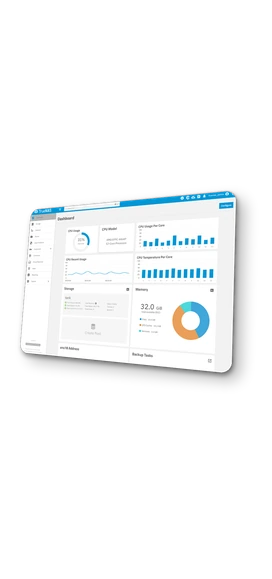
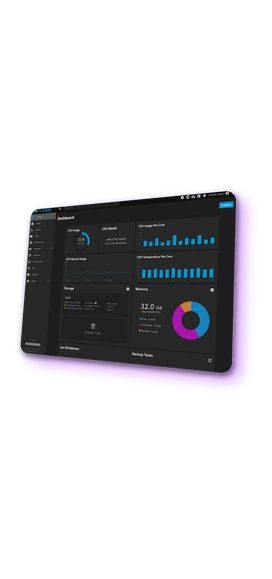

 HDD, SSD and NVMe to order
Instant or custom build
HDD, SSD and NVMe to order
Instant or custom build

 Drives up to 24 TB

 10+ locations
TrueNAS hardware requirements
ZFS manages redundancy and repair itself, so it must see every physical drive. A hardware RAID controller hides the drives behind one virtual volume, and ZFS can no longer tell which disk failed or repair the data on it. A storage server needs an HBA in IT mode or onboard SATA and NVMe, where every drive is passed through as is.
Data passes through RAM before ZFS writes it to disk, and a bit flip there is written as valid data. ECC memory corrects such errors and stops the system if it cannot. The TrueNAS hardware guide notes that most users strongly recommend ECC.
The base is 8 GB for up to eight drives plus 1 GB for each drive above that. iSCSI storage for virtual machines needs 32 GB or more; deduplication and L2ARC add several GB each. For a NAS with 8–24 drives this means 32–128 GB.
RAIDZ2 is chosen for capacity: eight 20 TB drives give 120 TB and survive two failed drives. Mirrors are chosen for speed: every pair adds write performance and a failed drive is rebuilt in hours, but half the capacity goes to the second copy. Backup and file storage runs on RAIDZ2, virtual machine storage on mirrors.
Virtual machines and databases wait for each write to be confirmed, and HDDs alone confirm writes slowly. One enterprise NVMe drive with power-loss protection as a write log (SLOG) speeds up synchronous writes by an order of magnitude. A mirrored NVMe pair as a special vdev holds the file system metadata, so work with millions of small files runs at flash speed.
The network sets the ceiling for a storage server: 1 Gbit/s carries about 110 MB/s, less than a single HDD. Traffic to a Proxmox VE cluster or a backup server runs over a private 25 Gbit/s VLAN between the servers, separate from the public port, which is enough for an NVMe pool over iSCSI or NVMe/TCP.
Dedicated server pricing for TrueNAS
View all configurations
Rent a dedicated server for TrueNAS
from INTROSERV


How to order a dedicated server
Select a configuration, then install TrueNAS over IP-KVM or request help from support.
Read the documentation

Installing TrueNAS over IP-KVM
Mounting the ISO, installing to the boot drive, first login and network setup.
Read the tutorialTrueNAS as storage for a Proxmox VE cluster
-
1
Prepare TrueNAS
A dataset for Proxmox is created, the iSCSI service is enabled with a portal, an initiator group and a target, and an API key is generated. For NVMe/TCP the NVMe-oF target service is enabled as well.
-
2
Install the plugin on the Proxmox nodes
The plugin is installed on every Proxmox VE node from the iXsystems APT repository nothing is installed on TrueNAS. Proxmox VE 8.x and 9.x are supported, NVMe/TCP requires 9.x.
-
3
Add the storage
One entry in the Proxmox storage configuration points to the TrueNAS address, API key, dataset and iSCSI target. The storage is marked as shared and appears on all nodes.
-
4
Create VM disks from Proxmox
Disks for VMs and containers are created, resized, snapshotted and migrated from the Proxmox interface. Snapshots are native ZFS snapshots on TrueNAS, including VM state with RAM. The traffic runs over the private VLAN between the servers.

TrueNAS licensing and support
Licensing
TrueNAS Community Edition is free and open source, with no license fees and no limits on capacity, drives or clients. SMB, NFS, iSCSI, NVMe/TCP, snapshots, replication, Docker apps and the TrueNAS Proxmox VE Storage Plugin are included.
Support
Community Edition is supported through the TrueNAS forums and documentation. Installation, pool and share configuration and the connection to a Proxmox VE cluster on INTROSERV servers can be ordered as hourly system administration.

FAQ
-
TrueNAS or Ceph as storage for a Proxmox cluster?
Ceph needs three or more nodes with identical disks and a dedicated network, and its overhead only pays off at that scale. A single TrueNAS server with mirrored NVMe over iSCSI or NVMe/TCP gives a two- or three-node Proxmox cluster shared storage with snapshots and live migration for the price of one server.
-
Why not run TrueNAS in a virtual machine?
The TrueNAS hardware guide lists virtualized TrueNAS with virtual disks as unsupported for production data: ZFS cannot see the physical drives and cannot protect against errors on them. On a dedicated server every drive is attached directly.
-
What happens when a drive fails?
The pool keeps running: RAIDZ2 survives two failed drives, a mirror one per pair. TrueNAS sends an alert, the client opens a support ticket, and INTROSERV replaces the drive in the data center. ZFS then rebuilds only the used data onto the new drive; a hot spare in the pool starts the rebuild without waiting for the replacement.
-
Can a TrueNAS pool be expanded later?
Yes. Since TrueNAS 24.10 a RAIDZ group can be widened by one drive at a time, and any pool grows by adding another group or by replacing drives with larger ones. Drives for free bays are added by a support ticket, and the monthly price changes accordingly.
-
Can TrueNAS be a Veeam backup repository?
Yes. Veeam Backup & Replication uses an SMB or NFS share or an iSCSI volume on TrueNAS as a repository. ZFS snapshots on the TrueNAS side add a recovery point that cannot be modified from the backup server.
-
Can TrueNAS run applications and virtual machines on the same server?
Yes. TrueNAS Community Edition runs Docker applications from its catalog on the storage server itself; virtual machines on KVM are available as well, and Linux system containers are still marked experimental. For a Proxmox cluster the recommended split is compute on Proxmox and storage on TrueNAS.
-
TrueNAS CORE or SCALE: which one to install?
SCALE. TrueNAS CORE, the FreeBSD line, ended with version 13.3 and is no longer under active development. TrueNAS SCALE on a Linux base is the current product, distributed as TrueNAS Community Edition; the installation image is still named TrueNAS-SCALE-25.10.x.iso. Existing CORE systems migrate to SCALE through the built-in update.
-
How much bandwidth does ZFS replication need?
Only the initial copy transfers the full dataset: 100 TB takes about ten days on 1 Gbit/s and about one day on 10 Gbit/s. After that, each run sends only the blocks changed since the last snapshot, typically a few percent of the data, so daily replication of a 100 TB pool fits into a normal port. Between two servers in the same data center the transfer runs over the private VLAN.






























