Deploy Odoo Community in one click
Open-source ERP and business apps on your own server
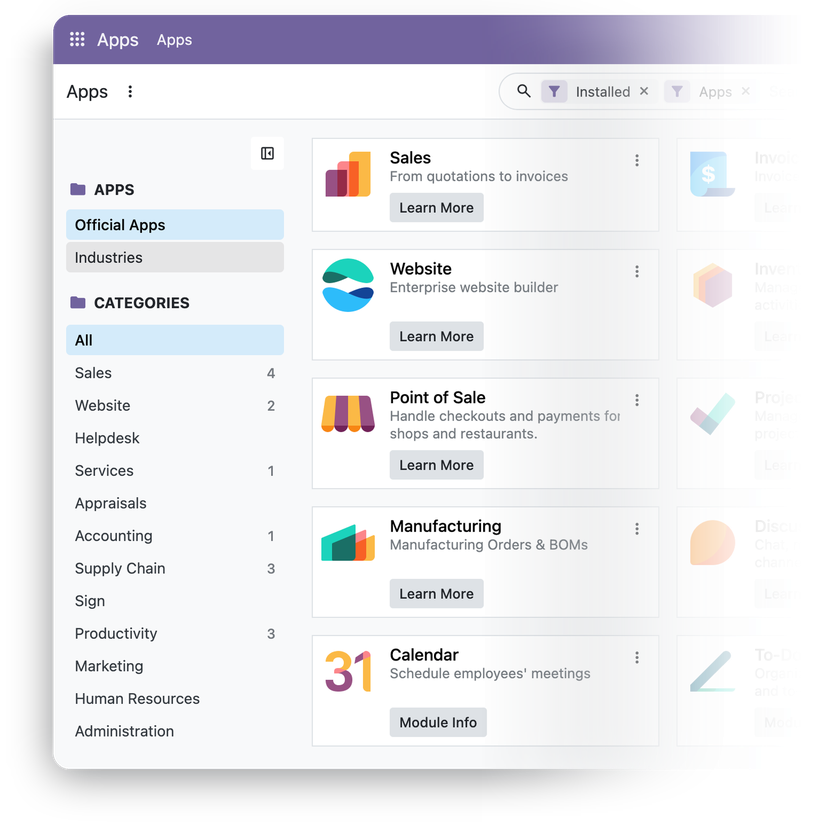
Odoo Community is the open-source edition of Odoo – a suite of integrated business apps for sales, operations, and finance.
-

 CRM with lead pipeline
-

 Quotations, orders, invoicing
-

 Inventory and purchasing
-

 Manufacturing
-

 Website builder and eCommerce
-

 Point of sale and projects

 Installs with your VPS

 Full root access

 Credentials in your panel

 HTTPS enabled by default
Key features
Start with one app and activate more later – all apps share one database, so an order flows to stock and invoices without sync.
Extend the core with modules from Odoo Apps or the Odoo Community Association – or write your own in Python.
Connect shops, BI tools, and scripts over HTTP with API keys – the successor to the deprecated XML-RPC and JSON-RPC endpoints.
Run several companies in one database – and invoice customers in foreign currencies.
Discuss channels and website live chat run over WebSocket – served by Odoo's dedicated gevent worker.
Country charts of accounts and taxes ship with the core – plus an interface translated into dozens of languages.
System requirements
View All VPS Options
Get started in 4 easy steps
-
1
Select a VPS plan
Choose the virtual server resources and performance tiers that fit your project requirements.
-
2
Pick your application
Browse our marketplace during VPS setup and select the self-hosted software you want to deploy.
-
3
Complete the payment
Pay the standard virtual server invoice – the 1-click deployment tool itself is fully complimentary.
-
4
Complete and access
Your server provisions and automatically installs the software. Once the setup process finishes, your new environment is fully ready for you to connect and use.
Deployment details


Application
Odoo 20.0 Community – latest stable release
- Official Docker image, unmodified
- Database initialized, demo data off, admin ready
Web access and SSL
Caddy serving Odoo over HTTPS
- Self-signed certificate enabled by default
- Built-in setup-ssl script issues a free Let's Encrypt certificate for your domain
Software licensing
LGPLv3 – open-source, no license fees
- Enterprise apps require a subscription from Odoo
- Full LGPLv3 license text
Why deploy on INTROSERV
-


NVMe storage
Every VPS runs on NVMe drives – fast I/O for databases, metrics, and busy workloads.
-


Locations in Europe and the US
Deploy close to your infrastructure and users – lower latency, regional compliance.
-


Unmetered traffic
No bandwidth caps and no overage bills – your monthly price stays predictable.
-


IPv4 and IPv6 included
A dedicated IPv4 address plus native IPv6 with every server.
-


24/7 human support
Engineers on duty around the clock – real answers, not ticket bots.
-


Scale anytime
Upgrade CPU, RAM, or storage as your workload grows – without migrating.
Terms and support boundaries
Infrastructure and support limits
Our company provides the Virtual Private Server infrastructure and the automation script for initial deployment. While we guarantee the availability and performance of your hardware and network, our technical support exclusively covers infrastructure-related issues – such as server connectivity, hardware stability, and billing. Assistance with application-specific configuration, software bugs, or user management is the responsibility of the server administrator or software maintainers.
Software licensing and compliance
All marketplace tools deploy standard versions of third-party software products and are provided "as-is" with no modifications to their original code. While the core of many available applications is open-source, using proprietary features or advanced enterprise tiers in production environments may be subject to the vendor's specific licensing terms. Users must manage and acquire any required commercial subscriptions directly from the software developers.
FAQ
-
Do I need a license to run Odoo Community?
No. Odoo Community is released under LGPLv3, with no user fees or activation keys. Enterprise-only apps, such as Studio and the full Accounting app, require a subscription purchased directly from Odoo.
-
How do I log in after deployment?
Open https://<server IP>/ and sign in as admin with the password shown in your INTROSERV panel. The browser warns about the self-signed certificate until you issue a trusted one. Change the admin password after the first login.
-
How do I get a trusted SSL certificate?
Point your domain's A record to the server, connect over SSH, and run setup-ssl. You can also use the server's FQDN. Caddy obtains the Let's Encrypt certificate and renews it automatically.
-
Can I migrate an existing Odoo database?
Yes, if it runs the same major Odoo version as your server. Restore your PostgreSQL dump as odoo_prod – the database name the server is configured to use – and copy the filestore to /opt/odoo/odoo/data/filestore/odoo_prod. Databases from older versions need an upgrade before the move.
-
How are updates handled?
The stack uses the official Odoo image pinned to the major version installed at deployment, so updates bring only fixes for that version. Back up the database, then run docker compose pull and docker compose up -d in /opt/odoo. Upgrading to a new major version requires a database upgrade and never happens automatically.
-
What if I outgrow my configuration?
Upgrade CPU and RAM without reinstalling. The worker count is set at install time, so raise workers in /opt/odoo/odoo/config/odoo.conf after resizing and restart the stack. Odoo recommends at most vCore × 2 + 1 workers.
-
How do I add custom or community modules?
Copy the module folders to /opt/odoo/odoo/addons and restart the stack. Then enable developer mode and click Update Apps List in Apps. Use only modules built for your installed Odoo version.
-
Can I switch to Odoo Enterprise later?
Yes. Enterprise runs on the same Community core with extra addons. With a subscription from Odoo, copy the Enterprise addons to /opt/odoo/odoo/addons and restart the stack – this folder is already in the addons path.