Deploy Zabbix Proxy in one click
Keep monitoring local at busy sites, without loading your central Zabbix Server
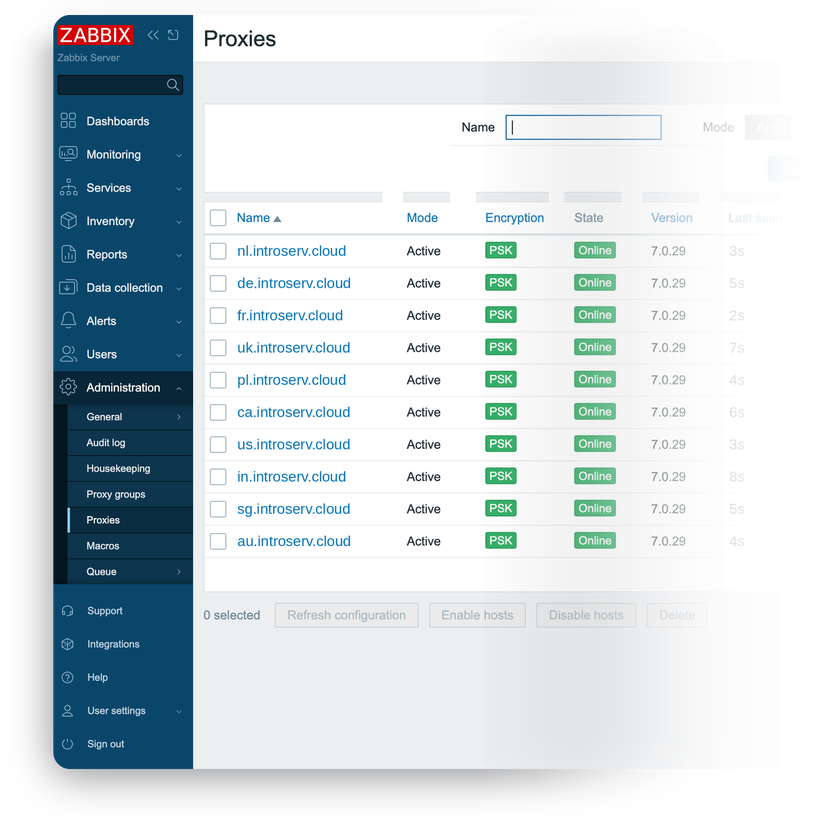
Direct polling overloads your Zabbix Server. Zabbix Proxy buffers data locally, reducing central load and preventing data loss during temporary network drops.
-

 Extends monitoring to remote sites
 -

 Buffers data locally
 -

 Active or passive connection
 -

 Same agent and agentless checks
 -

 Lightweight footprint
 -

 PSK-encrypted communication

 Installs with your VPS

 Full root access

 Live in ~5 minutes

 Pairs in one command
Key features
Point the proxy at your Zabbix Server as either the initiator or the listener, depending on which side of the firewall needs to open the connection.
An embedded SQLite buffer keeps collecting and queuing data during a network split or Server outage, then forwards the backlog once the connection returns.
Same monitoring methods as Zabbix Server: native agents for deep host metrics, or SNMP, IPMI, and HTTP polling for anything else.
Secure the channel between proxy and Server with a pre-shared key, without adding a separate VPN or tunnel.
Polling and pre-processing happen at the proxy, so your central Server spends less CPU and bandwidth on remote hosts.
No frontend, no separate database service – SQLite3 ships with the proxy package, so the whole stack fits on a modest VPS.
System requirements
View All VPS Options
Get started in 4 easy steps
-
1
Select a VPS plan
Choose the virtual server resources and performance tiers that fit your project requirements.
-
2
Pick your application
Browse our marketplace during VPS setup and select the self-hosted software you want to deploy.
-
3
Complete the payment
Pay the standard virtual server invoice – the 1-click deployment tool itself is fully complimentary.
-
4
Complete and access
Your server provisions and automatically installs the software. Once the setup process finishes, your new environment is fully ready for you to connect and use.
Deployment details
Application
Zabbix Proxy 7.0 LTS
- SQLite3 backend (zabbix-proxy-sqlite3)
- Same official Zabbix 7.0 repository as Zabbix Server, native apt install
Operating system
Ubuntu 24.04 LTS – clean minimal install
- Native packages, no containers
- Full root access over SSH


Connecting to your Zabbix Server
No reverse proxy, no web interface
- Built-in setup-proxy script pairs this proxy with your existing Zabbix Server
- Active or passive mode, PSK encryption optional


Software licensing
AGPLv3 – open-source, no license fees
- Same license as Zabbix Server: no host limits, feature gates, or paid tiers
- Full AGPLv3 license text
Why deploy on INTROSERV
-


NVMe storage
Every VPS runs on NVMe drives – fast I/O for databases, metrics, and busy workloads.
-


Locations in Europe and the US
Deploy close to your infrastructure and users – lower latency, regional compliance.
-


Unmetered traffic
No bandwidth caps and no overage bills – your monthly price stays predictable.
-


IPv4 and IPv6 included
A dedicated IPv4 address plus native IPv6 with every server.
-


24/7 human support
Engineers on duty around the clock – real answers, not ticket bots.
-


Scale anytime
Upgrade CPU, RAM, or storage as your workload grows – without migrating.
Terms and support boundaries
Infrastructure and support limits
Our company provides the Virtual Private Server infrastructure and the automation script for initial deployment. While we guarantee the availability and performance of your hardware and network, our technical support exclusively covers infrastructure-related issues – such as server connectivity, hardware stability, and billing. Assistance with application-specific configuration, software bugs, or user management is the responsibility of the server administrator or software maintainers.
Software licensing and compliance
All marketplace tools deploy standard versions of third-party software products and are provided "as-is" with no modifications to their original code. While the core of many available applications is open-source, using proprietary features or advanced enterprise tiers in production environments may be subject to the vendor's specific licensing terms. Users must manage and acquire any required commercial subscriptions directly from the software developers.
FAQ
-
Do I need a Zabbix Server to use this?
Yes. Zabbix Proxy only collects and forwards data – it doesn't monitor anything on its own. You need an existing Zabbix Server (self-hosted or elsewhere) for the proxy to report to.
-
How do I connect the proxy to my existing Zabbix Server?
Connect over SSH and run the
setup-proxyscript – it asks for your Zabbix Server address, the connection mode (active or passive), and an optional pre-shared key for encryption. -
Active or passive – which mode should I choose?
Active mode means the proxy opens the connection to your Zabbix Server – easier when the proxy sits behind NAT or a restrictive firewall. Passive mode means your Zabbix Server connects to the proxy – choose it when the Server can reach the proxy directly.
-
Does the proxy have a web interface?
No. There's no frontend on the proxy itself – you manage monitored hosts and view data through your existing Zabbix Server's web interface, where this proxy appears as a data source.
-
What happens if the network connection drops?
The local SQLite buffer keeps collecting and queuing data during the outage. Once the connection to your Zabbix Server is restored, the buffered history forwards automatically.
-
Do I need to install MySQL or PostgreSQL?
No. The proxy uses SQLite3, which ships embedded with the package – there's no separate database service to configure. For very high-throughput sites, a MySQL or PostgreSQL-backed proxy is a better fit than this SQLite build.
-
Can one Zabbix Server use several proxies?
Yes – running a proxy at each remote site or DMZ, all reporting to a single central Zabbix Server, is the standard distributed monitoring setup.
-
Does the proxy version need to match my Zabbix Server?
Major and minor versions have to match – a 7.0.x proxy pairs with a 7.0.y Server (the patch number can differ). Pairing with a different major.minor version fails with a version mismatch in the logs, so confirm your Server's version before running
setup-proxy.