Deploy RustFS in one click
S3-compatible object storage, ready in minutes
RustFS is an open-source, S3-compatible object storage server written in Rust – a drop-in alternative to MinIO under the permissive Apache 2.0 license.
-

 Broad S3 API compatibility
 -

 Drop-in MinIO alternative
 -

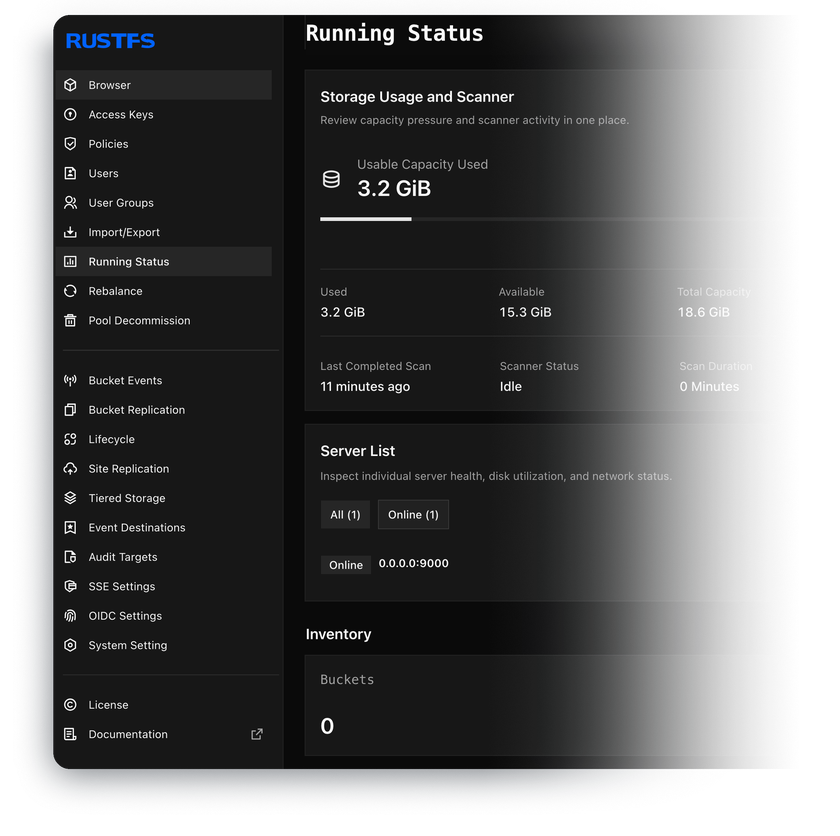
 Built-in web console
 -

 IAM users and access policies
 -

 Versioning and object lock
 -

 Lifecycle rules and quotas

 Installs with
your VPS

 Full root
access

 Live in
~5 minutes

 Unmetered
bandwidth
Key features
SigV4 auth, multipart uploads, and presigned URLs – existing SDKs, CLI clients, and backup tools connect without code changes.
Built for migration and coexistence with S3-compatible platforms like MinIO and Ceph – move buckets with standard S3 tooling.
Create buckets, browse objects, and manage access keys from the browser – no CLI needed for day-to-day tasks.
Users, groups, and JSON policies scoped to buckets or prefixes – plus OIDC integration for external identity providers.
Unique version IDs, delete markers, and point-in-time recovery – with WORM retention for compliance workloads.
Auto-delete old objects by age, cap each bucket's size with quotas – and mirror buckets to a second server, one-way or both ways.
System requirements
View All VPS Options
Get started in 4 easy steps
-
1
Select a VPS plan
Choose the virtual server resources and performance tiers that fit your project requirements.
-
2
Pick your application
Browse our marketplace during VPS setup and select the self-hosted software you want to deploy.
-
3
Complete the payment
Pay the standard virtual server invoice – the 1-click deployment tool itself is fully complimentary.
-
4
Complete and access
Your server provisions and automatically installs the software. Once the setup process finishes, your new environment is fully ready for you to connect and use.
Deployment details


Application
RustFS – official Docker image
- rustfs/rustfs image deployed via Docker Compose
- S3 API and web console running out of the box
Operating system
Ubuntu 24.04 LTS – clean minimal install
- Docker Compose deployment, object data on a host path
- Full root access over SSH


Web access and SSL
Nginx in front of RustFS with two HTTPS endpoints
- Self-signed certificate enabled by default
- web console on port 443, S3 API on port 9000
Storage and credentials
Everything generated and wired at first boot
- Object data lives on the VPS NVMe drive, on a host path
- A securely generated access key and secret in your client area and in /root/credentials.txt on the server


Software licensing
Apache License 2.0 – open-source, no license fees
- No capacity limits, feature gates, or paid tiers
- Full Apache 2.0 license text
Why deploy on INTROSERV
-


NVMe storage
Every VPS runs on NVMe drives – fast I/O for databases, metrics, and busy workloads.
-


Locations in Europe and the US
Deploy close to your infrastructure and users – lower latency, regional compliance.
-
Unmetered traffic
No bandwidth caps and no overage bills – your monthly price stays predictable.
-


IPv4 and IPv6 included
A dedicated IPv4 address plus native IPv6 with every server.
-


24/7 human support
Engineers on duty around the clock – real answers, not ticket bots.
-


Scale anytime
Upgrade CPU, RAM, or storage as your workload grows – without migrating.
Terms and support boundaries
Infrastructure and support limits
Our company provides the Virtual Private Server infrastructure and the automation script for initial deployment. While we guarantee the availability and performance of your hardware and network, our technical support exclusively covers infrastructure-related issues – such as server connectivity, hardware stability, and billing. Assistance with application-specific configuration, software bugs, or user management is the responsibility of the server administrator or software maintainers.
Software licensing and compliance
All marketplace tools deploy standard versions of third-party software products and are provided "as-is" with no modifications to their original code. While the core of many available applications is open-source, using proprietary features or advanced enterprise tiers in production environments may be subject to the vendor's specific licensing terms. Users must manage and acquire any required commercial subscriptions directly from the software developers.
FAQ
-
Do I need a license to run RustFS?
No. RustFS is fully open-source under the Apache License 2.0 – a permissive license with no copyleft obligations, capacity limits, or paid tiers. Commercial use is allowed out of the box. You only pay the standard virtual server invoice.
-
How do I log in after deployment?
Once the server is provisioned, you'll find the web console URL and a securely generated access key and secret in your INTROSERV panel. The same pair is stored in /root/credentials.txt on the server and works for both the console login and S3 clients. We recommend creating dedicated access keys per application instead of sharing the admin pair.
-
How do I get a valid SSL certificate?
The server ships with a self-signed certificate enabled by default – S3 clients will need their skip-verification flag (like --no-verify-ssl in AWS CLI) until you replace it. To issue a free Let's Encrypt certificate for your own domain or the server's FQDN, connect over SSH and run the setup-ssl script in the console – one command covers both the web console and the S3 API endpoint.
-
How do applications connect to the S3 API?
Point any S3 client at https://your-server:9000 with the access key and secret from your credentials, using path-style addressing. RustFS speaks standard AWS Signature Version 4, so AWS SDKs, rclone, s3cmd, and common backup tools work without modification. When generating presigned URLs, sign them against the externally reachable endpoint – the recipient's hostname, scheme, and port must match the signed values.
-
Can I migrate from MinIO or another S3 store?
Yes. RustFS is built for migration from and coexistence with S3-compatible platforms such as MinIO and Ceph. Copy buckets with any S3-to-S3 sync tool like rclone, then recreate users and policies on the new server – your applications only need a new endpoint and credentials.
-
How are updates handled?
RustFS runs as a Docker container. Connect over SSH, pull the new image, and restart the stack with Docker Compose – your object data lives on a host path and survives the update. You have full root access and decide when to apply updates – nothing updates behind your back.
-
How do I back up the data stored in RustFS?
Plan for a second copy – one server is one copy, however reliable the hardware. The built-in option is bucket replication to another S3 endpoint, such as a second RustFS instance or any S3-compatible storage. For scheduled offsite copies, any S3 sync tool like rclone works against the standard API – point it at your endpoint and mirror the buckets on a cron schedule.
-
What if I outgrow my configuration?
Upgrade the disk, CPU, or RAM of your VPS as your data grows – no reinstallation needed, object storage is disk-bound first. Lifecycle rules help by expiring old versions and incomplete uploads. Multi-node distributed clusters are a separate topology outside the one-click scope – on a single server, scale the disk.