Deploy Portainer in one click
Container management through a web UI, ready in minutes
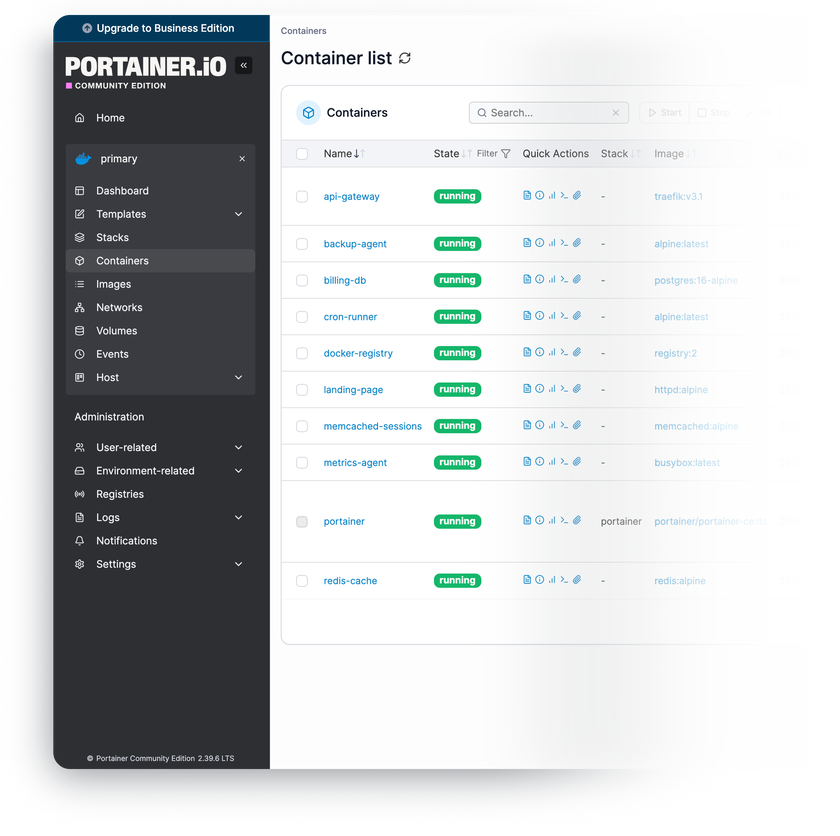
Portainer CE is the open-source web UI for managing container environments – Docker, Swarm, Kubernetes, and Podman from a single dashboard instead of a terminal.
-

 Docker, Swarm, and Kubernetes
 -

 Containers, images, volumes, networks
 -

 Compose stacks in the browser
 -

 Live container resource stats
 -

 Users, teams, and permissions
 -

 Private registry integration

 Installs with
your VPS

 Full root
access

 Live in
~2 minutes

 Latest LTS
installed
Key features
Attach additional Docker hosts, Swarm clusters, or Kubernetes to the same dashboard with the lightweight Portainer Agent – one pane of glass for your whole fleet.
Stacks pull straight from a Git repository and redeploy on push via webhooks or scheduled polling – your Compose files stay the single source of truth.
Exec into any container and stream its logs right from the browser – no extra tooling on your workstation.
Built-in templates spin up popular self-hosted apps with sane defaults – review ports and volumes before launch, or plug in your own template list.
Containers, stacks, and volumes carry ownership – restrict who sees and manages what across users and teams.
Everything the UI does is scriptable – provision stacks, manage environments, and wire Portainer into your CI/CD.
System requirements
View All VPS Options
Get started in 4 easy steps
-
1
Select a VPS plan
Choose the virtual server resources and performance tiers that fit your project requirements.
-
2
Pick your application
Browse our marketplace during VPS setup and select the self-hosted software you want to deploy.
-
3
Complete the payment
Pay the standard virtual server invoice – the 1-click deployment tool itself is fully complimentary.
-
4
Complete and access
Your server provisions and automatically installs the software. Once the setup process finishes, your new environment is fully ready for you to connect and use.
Deployment details
Application
Portainer Community Edition, LTS release stream
- Official portainer/portainer-ce:lts image
- Admin account created during provisioning – login and password arrive in your client area
Operating system
Ubuntu 24.04 LTS – clean minimal install
- Docker Engine and Docker Compose from the official Docker repository
- Full root access over SSH


Web access and SSL
Portainer serves its own web UI over HTTPS on port 9443
- Self-signed certificate enabled by default
- Plain HTTP and the Edge tunnel port are bound to localhost only


Data persistence
Portainer state lives in a named Docker volume
- Database, users, and stack definitions survive container updates and restarts
- Back up from the UI in Settings, or snapshot the volume itself


Software licensing
zlib license – open-source, no license fees
- Business Edition features require a license from the vendor
- Full zlib license text
Why deploy on INTROSERV
-


NVMe storage
Every VPS runs on NVMe drives – fast I/O for databases, metrics, and busy workloads.
-


Locations in Europe and the US
Deploy close to your infrastructure and users – lower latency, regional compliance.
-


Unmetered traffic
No bandwidth caps and no overage bills – your monthly price stays predictable.
-


IPv4 and IPv6 included
A dedicated IPv4 address plus native IPv6 with every server.
-


24/7 human support
Engineers on duty around the clock – real answers, not ticket bots.
-


Scale anytime
Upgrade CPU, RAM, or storage as your workload grows – without migrating.
Terms and support boundaries
Infrastructure and support limits
Our company provides the Virtual Private Server infrastructure and the automation script for initial deployment. While we guarantee the availability and performance of your hardware and network, our technical support exclusively covers infrastructure-related issues – such as server connectivity, hardware stability, and billing. Assistance with application-specific configuration, software bugs, or user management is the responsibility of the server administrator or software maintainers.
Software licensing and compliance
All marketplace tools deploy standard versions of third-party software products and are provided "as-is" with no modifications to their original code. While the core of many available applications is open-source, using proprietary features or advanced enterprise tiers in production environments may be subject to the vendor's specific licensing terms. Users must manage and acquire any required commercial subscriptions directly from the software developers.
FAQ
-
Do I need a license to run Portainer CE?
No. Portainer Community Edition is open-source under the zlib license – free for personal and commercial use, with no environment or user limits. Business Edition adds features like role-based access control and requires a license purchased from Portainer directly.
-
How do I log in after deployment?
The admin account is created automatically during provisioning – you'll find the URL, login, and a securely generated password in your INTROSERV panel as soon as the install finishes. The same credentials are also saved to /root/credentials.txt on the server itself. Open https://your-server-ip:9443 and sign in; we recommend changing the password after the first login.
-
Why does my browser warn about the certificate?
Portainer ships with a self-signed certificate on port 9443, so the first visit triggers a browser warning – the connection is still encrypted. To remove the warning, upload a certificate for your own domain in Settings, or issue one with any ACME client and point Portainer at the files.
-
Can I manage other servers from this Portainer?
Yes. Install the lightweight Portainer Agent on any other Docker host, Swarm cluster, or Kubernetes and add it as an environment – the server connects out to the agent on port 9001, so no changes are needed on this VPS. All environments then share one dashboard, one login, and one API.
-
What happens to my containers if Portainer is down?
Nothing. Portainer is a management layer, not a runtime – your workloads run on Docker itself and keep running if the Portainer container stops or restarts. You can always fall back to the Docker CLI over SSH.
-
How are updates handled?
The deployment tracks the official LTS image tag, and the UI notifies you when a new version is available. To update, pull the fresh image and recreate the Portainer container – your data volume carries the database across, and running workloads are not touched.
-
Can I migrate an existing Portainer instance?
Yes. Portainer keeps everything – users, environments, settings, and stack definitions – in its data volume. Stop Portainer on your current server, copy the contents of that volume into the data volume on this VPS, and start the container – it comes up with your configuration intact. Keep both sides on the same release stream to avoid database schema conflicts, and note that only Portainer's own data moves – workloads and their volumes migrate separately.
-
Can I use the same server for other tasks?
That's the intended pattern – Portainer itself is lightweight, and the VPS is a full Docker host with root access. Size the plan for the containers you'll actually run next to it, and revisit the tier when workloads approach the ranges listed above.