Deploy OpenClaw in one click
Your own AI assistant, always on
OpenClaw is an open-source personal AI assistant that runs on your own machine and meets you in the chat apps you already use.
-

 Runs shell commands and edits files
 -

 Persistent memory and workspace
 -

 Cron jobs and background tasks
 -

 Skills, plugins, and MCP servers
 -

 Works with any model provider
 -

 Meets you in WhatsApp, Telegram, Discord
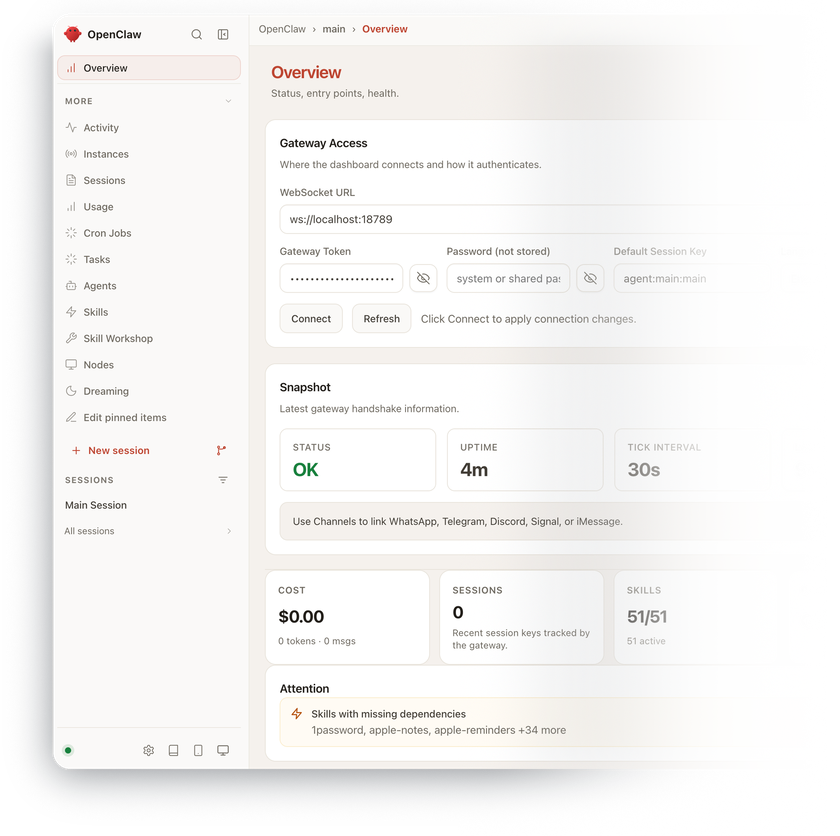

 Installs with
your VPS
Full rootaccess

 One-command
onboarding

 Access over
SSH tunnel
Key features
The Gateway owns sessions, tools, and channel connections, so Telegram, WhatsApp, Slack, Discord, Signal, Matrix, and more all reach the same assistant with the same context.
Built-in exec, process, file read/write, and patch tools let the agent do work on the server instead of only describing it.
Config, credentials, sessions, and the agent workspace all live under ~/.openclaw/, and openclaw backup create --verify produces a portable archive you can restore on any host.
Cron automations, background tasks, heartbeats, hooks, and standing orders let the assistant act on a schedule or react to events without a prompt.
SKILL.md instruction packs teach repeatable workflows, plugins add tools, channels, and providers from ClawHub or npm, and MCP servers plug in external systems.
Anthropic, OpenAI, Google, OpenRouter, Groq, Mistral, DeepSeek, and dozens more hosted providers – switch at any time with one config change.
System requirements
View All VPS Options
Get started in 4 easy steps
-
1
Select a VPS plan
Choose the virtual server resources and performance tiers that fit your project requirements.
-
2
Pick your application
Browse our marketplace during VPS setup and select the self-hosted software you want to deploy.
-
3
Complete the payment
Pay the standard virtual server invoice – the 1-click deployment tool itself is fully complimentary.
-
4
Complete and access
Your server provisions and automatically installs the software. Once the setup process finishes, your new environment is fully ready for you to connect and use.
Deployment details


Application
OpenClaw – installed from the official install-cli.sh script
- Tracks the current release; no version is pinned at deploy time
- Installed under
/opt/openclawwith its own pinned Node runtim
Operating system
Ubuntu 24.04 LTS – clean minimal install
- Native installation, no containers
- Full root access over SSH


First-run onboarding
One command configures the assistant and turns it into a service
openclaw onboard --install-daemonsets up provider, channels, and workspace, and installs the Gateway serviceopenclaw doctorandopenclaw healthfor diagnostics
Access model
No reverse proxy and no public web port
- Dashboard token:
grep -A3 '"auth"' ~/.openclaw/openclaw.json - Tunnel from your PC:
ssh -N -L 18789:127.0.0.1:18789 root@<server-ip>, then openhttp://localhost:18789/


Models and credentials
Model access is yours to configure
- Pick a provider during onboarding; switch anytime with openclaw models set
- All config and credentials live under ~/.openclaw/


Software licensing
MIT – open-source, no license fees
- No seat limits, feature gates, or paid tiers
- Full MIT license text
Why deploy on INTROSERV
-
NVMe storage
Every VPS runs on NVMe drives – fast I/O for databases, metrics, and busy workloads.
-


Locations in Europe and the US
Deploy close to your infrastructure and users – lower latency, regional compliance.
-
Unmetered traffic
No bandwidth caps and no overage bills – your monthly price stays predictable.
-


IPv4 and IPv6 included
A dedicated IPv4 address plus native IPv6 with every server.
-


24/7 human support
Engineers on duty around the clock – real answers, not ticket bots.
-


Scale anytime
Upgrade CPU, RAM, or storage as your workload grows – without migrating.
Terms and support boundaries
Infrastructure and support limits
Our company provides the Virtual Private Server infrastructure and the automation script for initial deployment. While we guarantee the availability and performance of your hardware and network, our technical support exclusively covers infrastructure-related issues – such as server connectivity, hardware stability, and billing. Assistance with application-specific configuration, software bugs, or user management is the responsibility of the server administrator or software maintainers.
Software licensing and compliance
All marketplace tools deploy standard versions of third-party software products and are provided "as-is" with no modifications to their original code. While the core of many available applications is open-source, using proprietary features or advanced enterprise tiers in production environments may be subject to the vendor's specific licensing terms. Users must manage and acquire any required commercial subscriptions directly from the software developers.
FAQ
-
Do I need to pay for OpenClaw?
No. OpenClaw is released under the MIT license by the OpenClaw Foundation – no seat limits, no feature gates, no paid tier. What you do pay for separately is model access: an API key or subscription from Anthropic, OpenAI, Google, or whichever provider you point it at.
-
How do I reach the assistant after deployment?
Four steps, all shown again on the server after install. Connect over SSH and run
openclaw onboard --install-daemon– it configures your model provider and channels and starts the Gateway as a service. Grab the dashboard token withgrep -A3 '"auth"' ~/.openclaw/openclaw.json, open a tunnel from your PC withssh -N -L 18789:127.0.0.1:18789 root@<your-server-ip>, and browse tohttp://localhost:18789/. -
Why is there no domain and HTTPS certificate?
Because the safest default for an agent that can run commands on your server is to not be on the public internet at all. Loopback plus an SSH tunnel needs no certificate and exposes no web port. If you later want a stable URL, the project documents Tailscale Serve and identity-aware proxy setups, both of which require Gateway auth to be configured first.
-
Which model should I run it on?
A hosted provider is the practical answer on a VPS. There is no GPU on these plans, so local inference through Ollama or llama.cpp will be slow or will not fit in RAM at all. Configure a provider key during onboarding and switch models later with
openclaw models set <provider/model>. -
Can I move an existing OpenClaw installation here?
Yes. Run
openclaw backup create --verifyon the old host, copy the archive over, and restore it withopenclaw backup restore <archive.tar.gz> --target <fresh-directory>, then activate it while the Gateway is stopped. Ratcheting channel credentials – WhatsApp in particular – can desynchronize on restore and may need relinking. -
How are updates handled?
Run
openclaw update: it detects the install type, fetches the release, runs doctor, and restarts the Gateway. The auto-updater is off by default, so nothing changes behind your back until you enable it or switch channels in the Control UI under Settings → Updates. -
How do I keep it safe if it can run commands?
Treat every inbound message as untrusted. OpenClaw pairs unknown DM senders before they can talk to the agent, tool policy controls which tools the model even sees, and exec approvals gate host commands. For anything beyond a single operator, read the project's security and sandboxing guides before connecting more channels.
-
What if I outgrow my configuration?
Upgrade CPU, RAM, or storage on the same VPS – no reinstall needed, all data and settings stay in place. A good signal it's time: you've added more channels or automations and the assistant starts responding slower or running out of memory.