Deploy Dokploy in one click
Your own PaaS – deploy apps like on Heroku, on your server
Dokploy is an open-source platform that turns a single VPS into a self-hosted alternative to Heroku, Vercel, and Netlify – push code, and it builds and ships your apps in Docker containers.
-

 Deploys apps straight from Git
 -

 Native Docker Compose support
 -

 Automatic HTTPS with Let's Encrypt
 -

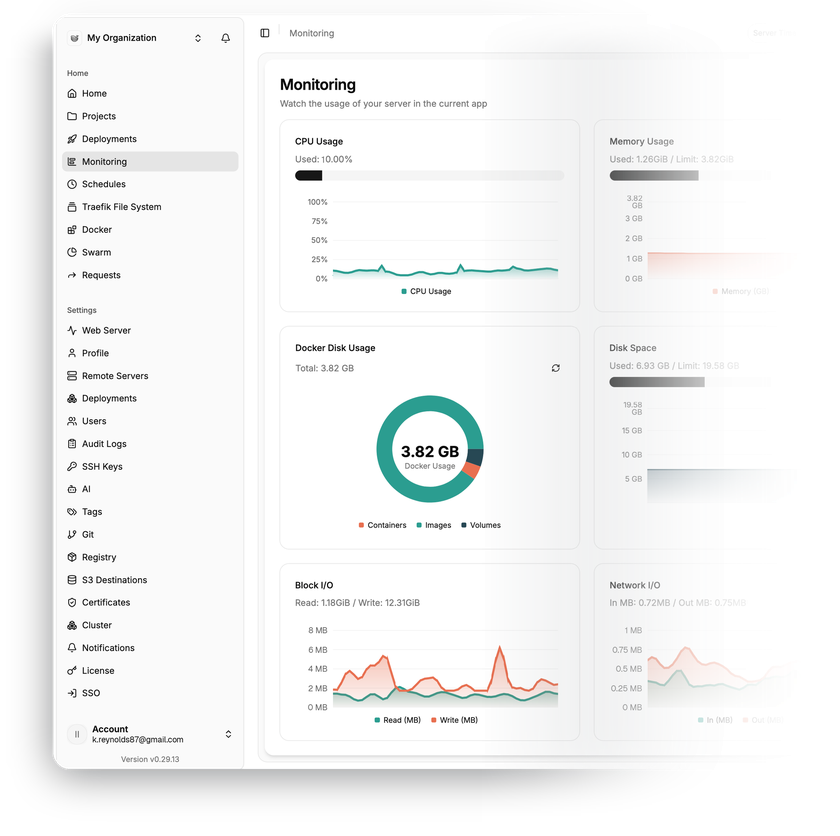
 Real-time monitoring and logs
 -

 Multi-server deployments
 -

 Databases deployed in one click

 Installs with
your VPS

 Full
Fullroot access

 Live in
~5 minutes

 Instant dashboard access
Key features
Bring a Dockerfile or skip it entirely – Nixpacks, Heroku Buildpacks, and Paketo Buildpacks detect your stack and build the app for you.
Spin up PostgreSQL, MySQL, MariaDB, MongoDB, or Redis from the dashboard – with manual and scheduled backups to S3-compatible storage.
Pick WordPress, Plausible, Gitea, Supabase, or hundreds of other open-source apps from the built-in library – one click and the app deploys as a preconfigured stack.
Domains, routing, and certificates are handled by the bundled Traefik proxy – certificates are issued and renewed without manual steps.
Manage deployments on additional servers from a single dashboard – and offload heavy builds to a dedicated build server.
CPU, memory, disk, and network usage per application, live logs, and a terminal into any running container.
System requirements
View All VPS Options
Get started in 4 easy steps
-
1
Select a VPS plan
Choose the virtual server resources and performance tiers that fit your project requirements.
-
2
Pick your application
Browse our marketplace during VPS setup and select the self-hosted software you want to deploy.
-
3
Complete the payment
Pay the standard virtual server invoice – the 1-click deployment tool itself is fully complimentary.
-
4
Complete and access
Your server provisions and automatically installs the software. Once the setup process finishes, your new environment is fully ready for you to connect and use.
Deployment details
Application
Dokploy – latest stable release
- The installer always deploys the current stable version from GitHub releases
- Dashboard, build engine, and proxy running out of the box
Operating system
Ubuntu 24.04 LTS – clean minimal install
- Docker Engine and Docker Swarm set up automatically
- Full root access over SSH
Platform components
Everything Dokploy needs runs as containers
- Traefik as the reverse proxy, PostgreSQL for Dokploy's own data, Redis for internal queues
- Your apps and databases run as separate containers alongside


Web access and SSL
Traefik as the default reverse proxy
- Dokploy dashboard served on port 3000
- Assign a domain in the dashboard – Traefik auto-issues a free Let's Encrypt certificate


Software licensing
Two licenses, split by directory in the official repository
- Apache 2.0 – all Dokploy code outside the /proprietary directory
- Dokploy Source Available License (DSAL) v1.0 – content inside the /proprietary directory
Why deploy on INTROSERV
-
NVMe storage
Every VPS runs on NVMe drives – fast I/O for databases, metrics, and busy workloads.
-


Locations in Europe and the US
Deploy close to your infrastructure and users – lower latency, regional compliance.
-


Unmetered traffic
No bandwidth caps and no overage bills – your monthly price stays predictable.
-


IPv4 and IPv6 included
A dedicated IPv4 address plus native IPv6 with every server.
-


24/7 human support
Engineers on duty around the clock – real answers, not ticket bots.
-


Scale anytime
Upgrade CPU, RAM, or storage as your workload grows – without migrating.
Terms and support boundaries
Infrastructure and support limits
Our company provides the Virtual Private Server infrastructure and the automation script for initial deployment. While we guarantee the availability and performance of your hardware and network, our technical support exclusively covers infrastructure-related issues – such as server connectivity, hardware stability, and billing. Assistance with application-specific configuration, software bugs, or user management is the responsibility of the server administrator or software maintainers.
Software licensing and compliance
All marketplace tools deploy standard versions of third-party software products and are provided "as-is" with no modifications to their original code. While the core of many available applications is open-source, using proprietary features or advanced enterprise tiers in production environments may be subject to the vendor's specific licensing terms. Users must manage and acquire any required commercial subscriptions directly from the software developers.
FAQ
-
Do I need a license to run Dokploy?
No. The Dokploy core is open-source under the Apache 2.0 license – no app limits, server limits, or fees for everyday deployments. Optional Enterprise features (SSO, SCIM provisioning, custom roles, audit logs, whitelabeling) are covered by the separate Dokploy Source Available License and require a paid license key purchased directly from the Dokploy team.
-
How do I log in after deployment?
Once the server is provisioned, you'll find the dashboard URL in your INTROSERV panel. On the first visit Dokploy asks you to create the administrator account – pick your own email and password, and you're in.
-
How do I get a valid SSL certificate?
Add your domain in the dashboard, point an A record at the server, and the built-in Traefik proxy issues a free Let's Encrypt certificate automatically – renewals included.
Once that works, disable direct dashboard access on port 3000, so the panel stays reachable only through your domain over HTTPS – the option is in the dashboard under the Web Server section. Important – do this only after you've confirmed the panel opens over https:// on your domain, otherwise you'll lose access to it.
Step-by-step instructions are in the official docs, Installation guide, section "Disable access via ip:port"
-
Do I need to write a Dockerfile for every app?
No. If your repo has one, Dokploy uses it – otherwise Nixpacks, Heroku Buildpacks, or Paketo Buildpacks detect the language (Node.js, PHP, Python, Go, Ruby, and others) and build the container for you.
-
Can I bring apps I already run with Docker Compose?
Yes. Dokploy has native Docker Compose support – point it at the repo with your compose file and deploy. You keep per-service logs, resource metrics, and terminal access, and Traefik can route domains to any service in the stack.
-
How are updates handled?
Dokploy notifies you about new releases, and updating is a single documented command over SSH. Your apps keep running during the platform update, and you have full root access – nothing updates behind your back. The exact command is in the official docs, Installation guide, section "Updating Dokploy"
-
Can I manage more than one server?
Yes. Add remote servers over SSH and deploy applications to them from the same dashboard – a remote server can be another VPS or a dedicated server, any Linux machine Dokploy can reach over SSH.
You can also designate a build server, so heavy Docker builds don't compete with production workloads for CPU and RAM.
-
What if I outgrow my configuration?
Upgrade CPU, RAM, or storage of your VPS as your app count grows – no reinstallation needed. RAM during Docker builds is usually the first bottleneck, so watch build times. When one server isn't enough, add remote servers through Dokploy instead of migrating.