Deploy CyberPanel in one click
A full web hosting control panel, ready in minutes
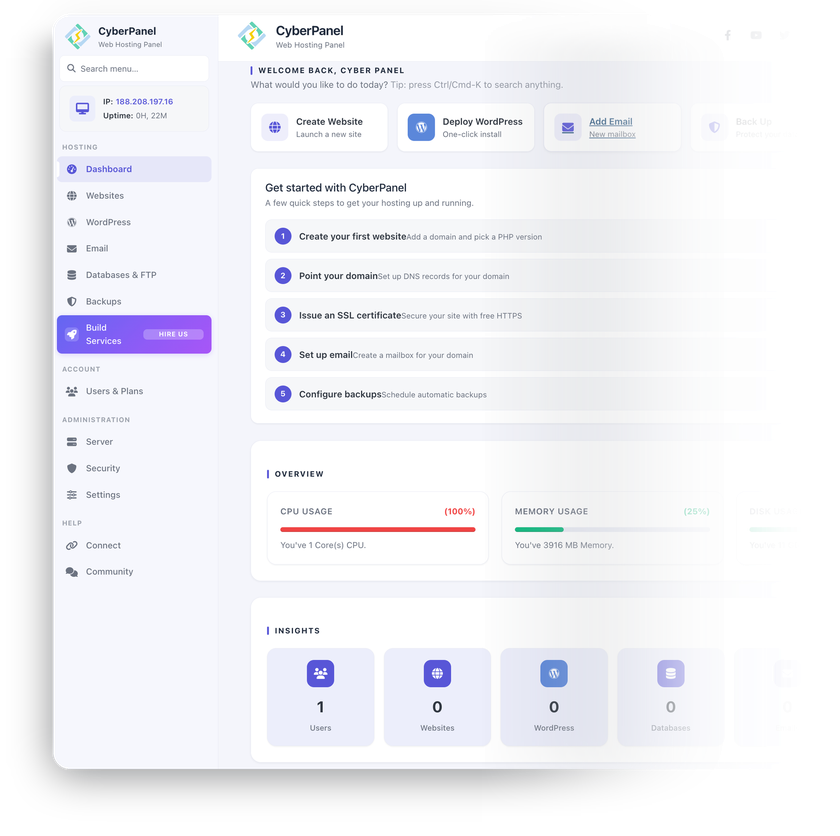
CyberPanel is an open-source hosting control panel built around the OpenLiteSpeed web server – websites, email, DNS, and FTP managed from one dashboard.
-

 Unlimited websites and domains
 -

 One-click WordPress with LSCache
 -

 Free Let's Encrypt SSL, auto-renewed
 -

 Built-in email, DNS, and FTP
 -

 ModSecurity WAF
 -

 Docker and Git deployment tools

 Installs with
your VPS

 Full root
access

 Live in
~10 minutes

 Instant dashboard access
Key features
Event-driven architecture with HTTP/3 and built-in page caching – fast sites without bolting on a separate caching layer.
The WordPress manager deploys a site in about a minute, with the LiteSpeed Cache plugin installed and configured automatically.
Create mail domains and mailboxes from the dashboard – Postfix handles delivery on your own server, under your own domain.
PowerDNS and Pure-FTPd run alongside the panel – authoritative DNS zones and FTP accounts without extra servers.
One-click ModSecurity with OWASP rules, firewall management, and two-factor authentication – enabled and tuned from the panel.
Upload, edit, and compress files in the browser – and delegate access with admin, reseller, and user roles.
System requirements
View All VPS Options
Get started in 4 easy steps
-
1
Select a VPS plan
Choose the virtual server resources and performance tiers that fit your project requirements.
-
2
Pick your application
Browse our marketplace during VPS setup and select the self-hosted software you want to deploy.
-
3
Complete the payment
Pay the standard virtual server invoice – the 1-click deployment tool itself is fully complimentary.
-
4
Complete and access
Your server provisions and automatically installs the software. Once the setup process finishes, your new environment is fully ready for you to connect and use.
Deployment details


Application
CyberPanel with OpenLiteSpeed (latest stable)
- Official CyberPanel installer, full-service setup
- Websites, email, DNS, and FTP working out of the box
Operating system
Ubuntu 24.04 LTS – clean minimal install
- Native installation, no containers
- Full root access over SSH
Panel access and SSL
CyberPanel dashboard served over HTTPS on port 8090
- Self-signed certificate enabled by default
- Free Let's Encrypt certificates for the panel hostname and every website


Database and services
Everything a hosting stack needs, configured automatically
- MariaDB set up and connected to the panel
- Postfix mail server, PowerDNS, and Pure-FTPd running as system services


Software licensing
GPLv3 – open-source, no license fees
- Unlimited domains and websites in the OpenLiteSpeed version
- Full GPLv3 license text
Why deploy on INTROSERV
-


NVMe storage
Every VPS runs on NVMe drives – fast I/O for databases, metrics, and busy workloads.
-


Locations in Europe and the US
Deploy close to your infrastructure and users – lower latency, regional compliance.
-
Unmetered traffic
No bandwidth caps and no overage bills – your monthly price stays predictable.
-


IPv4 and IPv6 included
A dedicated IPv4 address plus native IPv6 with every server.
-


24/7 human support
Engineers on duty around the clock – real answers, not ticket bots.
-


Scale anytime
Upgrade CPU, RAM, or storage as your workload grows – without migrating.
Terms and support boundaries
Infrastructure and support limits
Our company provides the Virtual Private Server infrastructure and the automation script for initial deployment. While we guarantee the availability and performance of your hardware and network, our technical support exclusively covers infrastructure-related issues – such as server connectivity, hardware stability, and billing. Assistance with application-specific configuration, software bugs, or user management is the responsibility of the server administrator or software maintainers.
Software licensing and compliance
All marketplace tools deploy standard versions of third-party software products and are provided "as-is" with no modifications to their original code. While the core of many available applications is open-source, using proprietary features or advanced enterprise tiers in production environments may be subject to the vendor's specific licensing terms. Users must manage and acquire any required commercial subscriptions directly from the software developers.
FAQ
-
Do I need a license to run CyberPanel?
No. CyberPanel is open-source, released under the GNU General Public License v3 (GPLv3), and the OpenLiteSpeed edition we deploy is free for an unlimited number of domains. Optional convenience add-ons sold by the CyberPanel team, and an upgrade to the commercial LiteSpeed Enterprise web server, are purchased from the vendor separately – neither is required to run the panel.
-
How do I log in after deployment?
Once the server is provisioned, you'll find the dashboard address – https://your-server-IP:8090 – and a securely generated admin password in your INTROSERV panel. Sign in over HTTPS and change the password after the first login.
-
How do I get a valid SSL certificate?
The dashboard ships with a self-signed certificate on port 8090. Point a hostname at your server, then issue a free Let's Encrypt certificate for the panel itself and for each website you create – directly from the CyberPanel interface, with auto-renewal handled for you.
-
Can I migrate sites from cPanel or another panel?
Yes. CyberPanel supports migrations from cPanel, Plesk, and other control panels using its built-in backup and restore tooling – site files, databases, and email move with the backup. Test one site first, then move the rest at your own pace.
-
Can I send and receive email from this server?
Yes – Postfix is installed and mail domains and mailboxes are created from the dashboard. For reliable inbox delivery, set a PTR record for your server's IP and publish SPF, DKIM, and DMARC records for your domain before sending real mail.
-
How are updates handled?
CyberPanel upgrades from inside the panel – Version Management shows the current release and runs the upgrade when you choose to. You have full root access and decide when to apply panel and OS updates – nothing updates behind your back.
-
What is the difference between OpenLiteSpeed and LiteSpeed Enterprise?
Both editions share the same core – the LSCache engine, HTTP/3, and unlimited domains. The practical difference is .htaccess handling: OpenLiteSpeed reads Apache rewrite rules but applies .htaccess changes only after a web server restart, while Enterprise picks them up on the fly.
Enterprise also acts as a full Apache drop-in replacement and can cache pages that mix public and personalized content, which matters for busy online stores. This deployment runs OpenLiteSpeed – free with no domain limits. If you later need Enterprise, CyberPanel supports switching to it, with licenses sold by LiteSpeed Technologies.
-
What if I outgrow my configuration?
Upgrade CPU, RAM, or storage of your VPS as your sites and traffic grow – no reinstallation needed. Watch RAM first: PHP workers, MariaDB, and mail services compete for it as site count rises, and disk fills with mail and backups over time.