Deploy Proxmox Datacenter Manager in one click
All your Proxmox clusters, one control plane
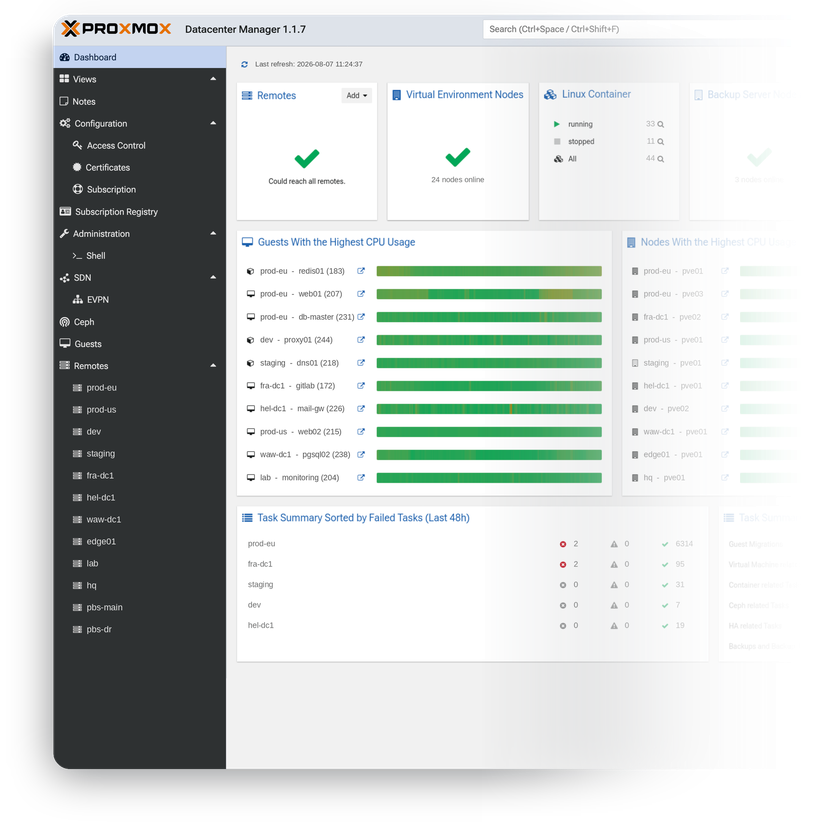
Proxmox Datacenter Manager is the official open-source platform for overseeing multiple Proxmox VE and Proxmox Backup Server installations from a single interface – nodes, clusters, and datastores across any location. It goes beyond monitoring: start, stop, and live-migrate VMs and containers between clusters right from the central view.
-

 Every cluster in one dashboard
 -

 Manages PVE and PBS remotes
 -

 Cross-cluster live migration
 -

 Fleet-wide update monitoring
 -

 EVPN SDN across clusters
 -

 LDAP, OpenID Connect, and 2FA

 Installs with
your VPS

 Full root
access

 Live in
~5 minutes

 Instant dashboard access
Key features
Connect independent Proxmox VE nodes, clusters, and Backup Server instances as remotes – single hosts and multi-node datacenters side by side.
Move running guests between nodes of different remotes over the API – no shared cluster network required.
Health, load, and failed tasks across the whole fleet on one screen, with aggregated task logs for auditing and troubleshooting.
Unified view of monitors, managers, OSDs, pools, and CephFS state across every connected cluster.
Available updates and security patches across all connected nodes surface in one list – no more logging into each cluster to check.
LDAP, Active Directory, and OpenID Connect SSO with granular roles, API tokens, and two-factor authentication.
System requirements
View All VPS Options
Get started in 4 easy steps
-
1
Select a VPS plan
Choose the virtual server resources and performance tiers that fit your project requirements.
-
2
Pick your application
Browse our marketplace during VPS setup and select the self-hosted software you want to deploy.
-
3
Complete the payment
Pay the standard virtual server invoice – the 1-click deployment tool itself is fully complimentary.
-
4
Complete and access
Your server provisions and automatically installs the software. Once the setup process finishes, your new environment is fully ready for you to connect and use.
Deployment details


Application
Proxmox Datacenter Manager – current stable release
- Package from the official pdm-no-subscription repository
- Web interface and REST API running out of the box
Operating system
Debian 13 "Trixie" – clean minimal install
- Standard Debian kernel
- Native apt packages, no containers


Web access and SSL
PDM runs HTTPS web UI on port 8443
- Self-signed certificate enabled by default
- Built-in ACME support issues and auto-renews a free Let's Encrypt


Software licensing
AGPLv3 – open-source, no license fees
- No remote limits, feature gates, or paid tiers
- Full AGPLv3 license text
Why deploy on INTROSERV
-


NVMe storage
Every VPS runs on NVMe drives – fast I/O for databases, metrics, and busy workloads.
-


Locations in Europe and the US
Deploy close to your infrastructure and users – lower latency, regional compliance.
-


Unmetered traffic
No bandwidth caps and no overage bills – your monthly price stays predictable.
-


IPv4 and IPv6 included
A dedicated IPv4 address plus native IPv6 with every server.
-


24/7 human support
Engineers on duty around the clock – real answers, not ticket bots.
-


Scale anytime
Upgrade CPU, RAM, or storage as your workload grows – without migrating.
Terms and support boundaries
Infrastructure and support limits
Our company provides the Virtual Private Server infrastructure and the automation script for initial deployment. While we guarantee the availability and performance of your hardware and network, our technical support exclusively covers infrastructure-related issues – such as server connectivity, hardware stability, and billing. Assistance with application-specific configuration, software bugs, or user management is the responsibility of the server administrator or software maintainers.
Software licensing and compliance
All marketplace tools deploy standard versions of third-party software products and are provided "as-is" with no modifications to their original code. While the core of many available applications is open-source, using proprietary features or advanced enterprise tiers in production environments may be subject to the vendor's specific licensing terms. Users must manage and acquire any required commercial subscriptions directly from the software developers.
FAQ
-
Do I need a license or subscription to run Proxmox Datacenter Manager?
No. The software is fully open-source under the GNU Affero General Public License v3 (AGPLv3) – no paid tiers or feature restrictions. Proxmox subscriptions are optional: they unlock the enterprise package repository and vendor support, and you arrange them with Proxmox directly if you want them.
-
How do I log in after deployment?
Once the server is provisioned, the web interface address appears in the Marketplace tab of your INTROSERV panel. Sign in with the same credentials you use for SSH – the login and password shown in the Details tab. The interface runs over HTTPS on port 8443.
-
How do I get a valid SSL certificate?
The server ships with a self-signed certificate enabled by default. Certificate management is built into the product: open the web interface, add your domain under Certificates, and the integrated ACME client issues a free Let's Encrypt certificate and renews it automatically – no console work needed.
-
Which Proxmox VE and Backup Server versions can I connect?
Proxmox VE 8.4 or newer and Proxmox Backup Server 3.4 or newer. Proxmox supports all actively maintained releases of both products and recommends keeping the manager and the remotes upgraded to use every feature.
-
What happens to my clusters if the manager goes down?
Nothing. The architecture is deliberately loosely coupled – remotes run fully independently, and no node, guest, or backup job depends on the manager being online. It is a control plane, not a single point of failure.
-
Does it replace Proxmox VE clustering?
No. The manager connects to existing nodes and clusters over their API as remotes – no corosync links or shared cluster network between sites. Your clusters keep working exactly as before, and for deep configuration each remote's native web interface is one click away.
-
How are updates handled?
The server tracks the official Proxmox Datacenter Manager repository for Debian Trixie, so updates arrive through the standard package manager – apply them over SSH or right from the PDM web interface. You have full root access and decide when to apply them.
-
What if my infrastructure outgrows the configuration?
Upgrade CPU, RAM, or storage of your VPS as your inventory grows – no reinstallation needed. Headroom is generous: Proxmox has tested the platform with over 5000 connected remotes and 10000 virtual guests on moderate hardware.